Showing posts with label save the date. Show all posts

Thursday, December 3, 2009

Save the Date Stress? Part 3


I promise, this is the final post about my Save the Date’s!

I know that I already lamented about our printer problems, but there are a few things that we learned with our Save the Date process that I’d like to mention…because if I could do it all over again, I would change a few things! Perhaps you will be smarter than me, and potentially learn from my mistakes? If you missed them, here is Part 1 and Part 2

*First, make sure you are using a computer that isn’t going to freak out on you when you’re printing. I did get a few questions/comments about why I didn’t just do a mail merge. Yes, that seems like that would have been the good plan to implement. Whoops. However, my computer is touchy, and recently it has been freezing up at the drop of a hat…probably because I have used up almost all of my memory. Which reminds me, I need to clean out my computer. So aggravating. Anyway, use MAIL MERGE if you can!

Source

*Secondly, I would make sure that my magnets/Save the Date’s included the city where the wedding is taking place. Since our current address is in Virginia, and the wedding is in Florida, I didn’t realize that it would cause confusion! Someone called my parents and asked if the wedding is in California! I am really not sure why they thought that…perhaps the VA looked like CA to them???

*Third, I would be certain that we sign both our first and last names in the cards for guests who don’t know us well! This wasn’t a problem for most of our guests, as most of the guest list was aware they were receiving a card in the first place, but there were a few of my dad’s coworkers who had no clue who “Katie and Justin” were. D’oh! I feel incredibly dumb.

Source

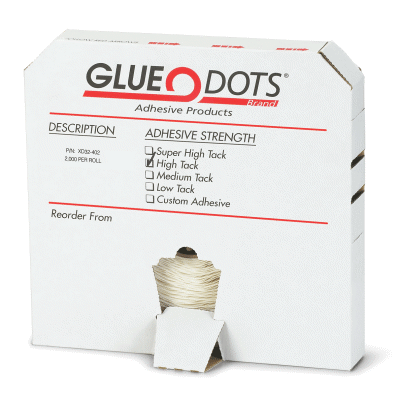
*Last, but not least, we would make sure my mom checked the glue dot package before sticking them to the magnets/cards. As we were doing it, I thought to myself that the glue dots felt pretty strong, but we kept going anyway. When I got home over Thanksgiving, I asked my mom if she still had the package the dots came in (she has just given me the roll). Sure enough, on the package the box was not marked “light tack,” or “medium tack,” but SUPER HIGH TACK! Well, no wonder people were having a hard time taking the magnet out of the card…sorry everyone!

All in all, I’m glad that we were able to see what problems arose while creating our Save the Date’s…I’m thinking of it as a practice run for the invites, and I am hoping that we won’t run into similar problems with those!

Did you learn some important things while creating your invites/Save the Date’s? Any good tips to share to keep people sane?

Wednesday, December 2, 2009

Save the Date Stress? Part 2


Ok, so in Part 1, the drama ensued. Thankfully, we were able to get ourselves out of the address-label weeds and work out a system.

Now, I’ll show you what these bad boys looked like!

Here is our little setup: my trusty google doc spreadsheet with addresses (yes, they are color coded in blue for Justin’s guests, and pink for mine…), the magnets, glue dots, the cards and envelopes (clearly), and the ink pad/stamp.

I printed the envelopes while Justin attached a glue dot to the back of the magnet and placed it inside the card.

I painstakingly placed each adorable little bird stamp in the left corner of the address. I broke down and decided to put the custom stamp on hold for the moment, and when I went to Michael’s one day…this bird stamp was waiting there for me!

I may have had a glass of wine or two during the process…

And…here you have it folks! A little peek at the finished product…I’m so glad that they are complete!


The next day, Justin and I headed to the post office to drop them off…so sad (yet relieved) to see them go!

Gotta love the awkward blue trash can in the picture...

See ya, Save the Date's...


Were you relieved when you got your Save the Date’s out?

Tuesday, December 1, 2009

Save the Date Stress? Part 1


I may or may not have implied that there was a bit of stress involved with putting together our Save the Date’s…

Don’t worry, it all turned out fine! I just like to be dramatic. You see, this is how it went down (2 weeks ago…):

On Thursday, Justin and I picked up some clear Avery labels…return address and 2"x4” shipping labels. For convenience’s sake, I had determined that we’d just print sheets of address labels with pretty font. I found a great font and downloaded it for FREE on Fontspace.com. Done and done.

Not so much.

To make a long story short, the instructions on the labels say to print a test sheet before printing on the actual labels. Easy enough, right? We put a test sheet in the printer…the labels looked perfect when we held them up against the real deal. Ok, we’re good to go. However, when we put the label sheet in the printer, they came out COMPLETELY DIFFERENT. What the…

At first, I figured I must have hit something on my keyboard and it was my fault. So, we tried another test sheet. It looked perfect…again. So, we put in the real sheet again. And, guess what? It came out wrong…AGAIN!

I walked away for the night, and poured myself a glass of wine. I was frustrated.

Fast forward to Friday night. It was time to tackle the labels again. We went through the same process…and ruined three more sheets of labels. Cursing may or may not have been involved. I started pulling at my hair. Justin immediately tells me to get the heck out of the room before I smash my computer into pieces.

I took my frustrations out on the labels instead...

So then, I took a breath, and then frantically began to scroll through the template options on my computer…and thanked my lucky stars that they had the right size of envelope included. We tested the printer on one of our precious envelopes (we have 93 to send, out of 100 in the package…so we can’t make many mistakes!)…it looked great.

Insert sigh of relief. This can work…

Except for the fact that we now have to print every single envelope one…at…a…time.

We opened a bottle of wine (sensing a trend???) and got to work. Justin assembled the cards, I typed addresses and printed the envelopes.

More than four hours later, we were done! Well, 2/3 of the way done at least. I’m still missing a few addresses…

Want to see them? Well, too bad! I am going to keep you in suspense for Part 2 for the big reveal!

Did you have any frustration involved in making Save the Date’s or invitations?

Friday, November 13, 2009

Save the Date Semi-Fail?

Source


Notes to self:

Look up the proper way to address Save the Date’s BEFORE printing address labels. If you have the gut feeling that you are doing it wrong…you probably are (Oh…its Mr. and Mrs. Joe Schmoe? NOT Mr. Joe and Jane Schmoe? ***smashes head against table***)…

After stamping the envelopes, make sure to let Justin know that the ink is wet so he doesn’t smear the pretty bird all over the envelope…DOH!!!! Then, attempt in vain to touch up the ink smudge with a Q-tip and water (you think I’m kidding? I’m totally not…).

Be VERY careful when writing the greeting inside the card, otherwise you’ll be trying in vain to disguise messed up spelling (HOW IN THE WORLD did I spell my fiancĂ©’s name WRONG?!?!!?).

When in doubt…pour yourself a glass of wine, or other icy adult beverage.

Breathe in, breathe out.

Keep on keeping on…

Hopefully I will be able to show you the labor of love that is our Save the Date’s very soon! For now, I am attempting to resist the urge to bang my head against my coffee table...